Smaart Suite and Smaart SPL come preconfigured with several built-in and predefined sound level measurement types. If a selected input channel is calibrated for sound level measurement, all of the following sound level measurement types are always available.
A-weighted, C-weighted or unweighted SPL with Fast or Slow exponential time weighting
A-weighted, C-weighted or unweighted Leq with a one-minute integration period (Leq 1)
C-weighted peak sound level (Peak C)
Unweighted peak Signal level referenced to normalized digital Full Scale (FS Peak)
A new installation of Smaart Suite or Smaart SPL will also include five additional measurement type options for calibrated input channels, including Leq 10 (A-weighted, C-weighted or unweighted) Exposure N, and Exposure O. These can be deleted or changed via the Custom Metrics tab of the SPL Config dialog (see below). If the input channel selected input for a meter is uncalibrated, the only available option will be FS Peak.
User Definable Measurement Types (Custom Metrics)
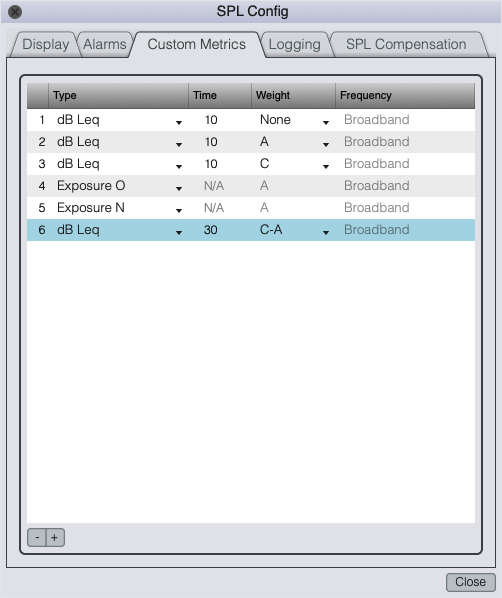
Custom Metrics tab of the SPL Config dialog.
On the Custom Metrics tab of the SPL Config dialog you can create user-defined measurement types for sound level metering. User definable measurement types in Smaart can include SPL and Leq for individual one-octave bands in addition to standard A and C broadband frequency weighting and C−A (the difference between C- and A-weighted Leq). Leq integration periods can range from one second up to 1440 minutes (24 hours).
Smaart can also calculate sound exposure based on U.S. Occupational Safety and Health Administration (OSHA) or U.S. National Institute for Occupational Safety and Health (NIOSH) guidelines. These two options are designated by initials “O” and “N” in measurement Type lists.
Please note that in order to fully ensure accuracy and traceability of sound level and exposure measurements and compliance with any applicable regulations or work rules, a fully class-compliant measurement microphone must be used and your entire Smaart setup, including the computer and software, input device(s), microphone(s) and cabling must be certified by an accredited test lab for compliance with applicable standards for sound level meters and dosimeters.
Configuring Metrics
To add a new user-defined measurement type, click the plus (+) button to below the table to add a new row, then click on its Type field to select the desired base measurement type. These include Leq, Fast or Slow SPL, Exposure (N or O) or Peak.
For Leq measurements, you can then click on the Time field and specify the integration period in minutes or seconds. The default unit size is minutes. Add an "s" to the entry to configure in seconds, or an “h” for hours. For example, enter “10” for a 10 minute Leq buffer or “10s” for ten seconds, “10h” would give 10 hours, or 600 minutes. After setting a desired integration time, be sure to press the [Enter] key on your keyboard to set the change.
Frequency weighting for SPL, Leq, or Peak sound level measurements (exposure is always A-weighted) is set by the drop-list controls in the Weight column. Options for all of the above include standard A and C weighting curves or None – assuming that your microphone and preamp are flat to within the specified tolerances for a given sound level meter performance class from 20 Hz to 20 kHz, a setting of None equates to Z-weighting.
For Leq measurements, you have the additional option of C–A, which shows you the difference between C- and A-weighted broadband sound levels. You can also set up Leq measurements for individual Octave bands. Selecting Octave as the frequency weighting in the Weight column enables the list box in the Frequency column, where you can select the center frequency of the octave band that you want to monitor.
To add an exposure measurement type, click the plus (+) button and select Exposure N or Exposure O from the Type list. These are essentially the same with the exception of the permissible exposure levels for an 8 hour work shift and the “exchange rate” that determines reduction in allowable exposure time as sound level increases, the NIOSH (Exposure N) recommendations being stricter in both respects. There are no additional options to select for exposure measurements. Exposure meters display a percentage of the permissible daily dosage for sound at measured levels.
To delete an existing measurement type, select it in the list by clicking on its number in the first column on the left, then click the minus (−) button below the table. When you click the OK button to exit the dialog window, all applicable selector menus and lists will be updated to reflect your changes.