Smaart can perform sound level (SPL and Leq) level logging on any calibrated input that is selected for use in I-O Config. “Calibrated,” in this context, simply means that the calibration offset (Cal. Offset) specified for the input in I-O Config is greater than 0 dB. Of course, sound level measurements are only accurate if the input is calibrated accurately. To learn more about accuracy and SPL calibration, see the Sound Level Calibration article.
Logging Details
The Interval setting controls how often log files are updated with a new data point. The default value is 3. This means that after every three seconds, the log will update with new data. When this happens, the value displayed is the highest value seen for each metric during this three second period.
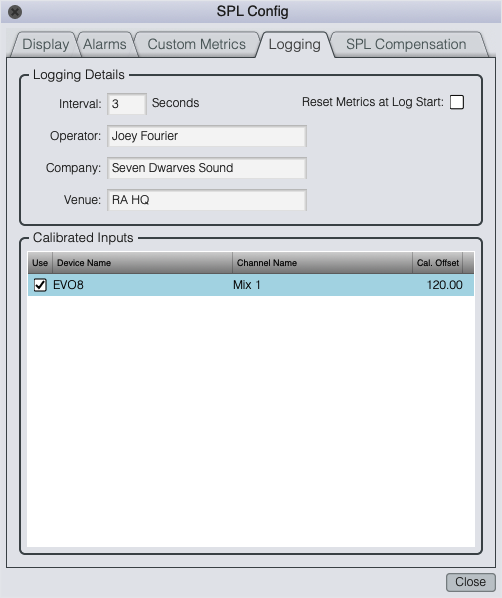
Logging tab of the SPL Config dialog.
The Operator, Company, and Venue fields are all optional. If you fill these in, your entries will appear in all log file headers, and if you don't they won't. Checking Reset Metrics At Log Start will cause all buffers to be reset automatically when logging starts.
Calibrated Inputs
To select an input channel for logging, click the check box next to its name in the list or select all calibrated inputs on a given input device by clicking the check box next to the device name. Input devices and channels are listed by their friendly names. If you don't see a device or channel that you want to log, check its Cal. Offset and Friendly Name settings and make sure that its Use check box is checked in I-O Config.
Logging begins when you click the Start Logging button and continues until you explicitly turn it off or exit the program. If you exit the program with logging turned on, logging will resume automatically when the program is restarted, making it possible to set up scheduled operations or auto-recover from system crashes or power failures using your OS scheduler or other third-party tools. The logger will start a new log file every 24 hours when running continuously.
Log File Format
Smaart sound level log files are written in plain, tab-delimited ASCII text format. When logging is turned on, Smaart creates a separate file for each input channel that has been selected for logging in the designated folder for sound level log files in your Smaart data library. The default location is a folder called SPL Logs in the data folder of the Smaart Suite or Smaart SPL folder that the program creates in the Documents folder for your user account the first time you run it.
Completed log files consist of a header block followed by a data table containing each of the 11 built-in measurement types plus additional columns for any user-defined measurement types that you may have configured. Built-in types include A, C, and unweighted sound pressure levels with standard Fast and Slow exponential time integration, A, C, and unweighted Leq 1 (1 minute), and C-weighted peak sound level (Peak C). For the SPL levels, Smaart uses the maximum reading recorded during each logging interval. Leq levels are the Leq at the time each line in the file was written.
In addition to the SPL and Leq data, C−A levels for one-minute Leq (Leq 1) are calculated for each logging interval and four additional columns record alarm events, input overloads and Leq buffer resets. C−A levels are simply the difference between A-weighted Leq and C-weighted Leq, which provides a rough estimate of the low-frequency content of the sounds being measured. Alarms, overloads, and Leq resets are marked by asterisks.
Log files are named automatically using the date and time (year, month, day, hour, minute), followed by the input device and channel friendly names assigned in I-O Config.
Log data files: YYYYMMDD.HHMM.DeviceName.InputName.data.txt
Completed log files: YYYYMMDD.HHMM.DeviceName.InputName.txt
While logging is in progress, the log data file will contain only the data table. When you turn logging off or exit Smaart normally, the header blocks are written and the completed files are renamed automatically. In the event of a program or system crash or power loss, header blocks will not be written but all measurement data collected can still be found in the log data file. This data can be recovered by creating your own header, if the situation required it.
Header files are comprised of environment information, max levels and event counts. Environment data includes the file creation date, the operator, company and venue names from the Log Config dialog, input device and channel names, the calibration date if known, and the Smaart software version number. Calibration dates for each input channel are based on the last time the calibration offset for the channel was changed and are stored in the Smaart config file. The max levels and event summaries section includes alarm levels specified in the Alarm Config dialog (accessible from SPL Config), the total number of times each alarm was triggered and the total number of times the input channel was overloaded, along with max levels recorded for the entire log for each SPL and Leq type.
If the input device being logged is an SGAudio Aps 10EaZy, an additional block of information will appear in the header containing settings from the 10EaZy Maximum Average Manager Config section in SPL Config, the calibration type (factory or user) and the number times the specified limit level for the MAM was exceeded.