The following are some example measurement-system setup diagrams for Transfer Function and dual-channel IR measurement in Smaart. Dual-channel measurements are made by comparing a reference Signal (system input) and a measurement signal (system output). They are an essential tool for aligning loudspeaker systems because unlike “time-blind” single-channel RTA measurements, dual-channel measurements can show you both the Magnitude (energy) and Phase (timing) response of a system. Additionally, the same pair of signals (reference and measurement) can be used to calculate the coherence function, an assessment of the linearity of a system that can provide important clues about signal-to-noise ratio, reverberance, and overall quality of your measurement data.
Stereo (2x2) I-O Device
In this example, Smaart’s signal generator is used to excite the system under test. The signal generator is assigned to output 1 of a 2-in/2-out audio input-output (I-O) device, labeled “Stereo Audio I-O” in the diagram below. The I-O device is connected to the computer via USB or Firewire. Output 1 is connected to the input of the system under test and also routed back to input 1 on the audio I-O using a Y-split cable (a hard-wired loopback like this works just fine, although there are a few different options available). Input 1 on the audio I-O will be assigned as the reference signal of a transfer function measurement in Smaart. A measurement microphone connected to input 2 of the I-O device provides the measurement signal.
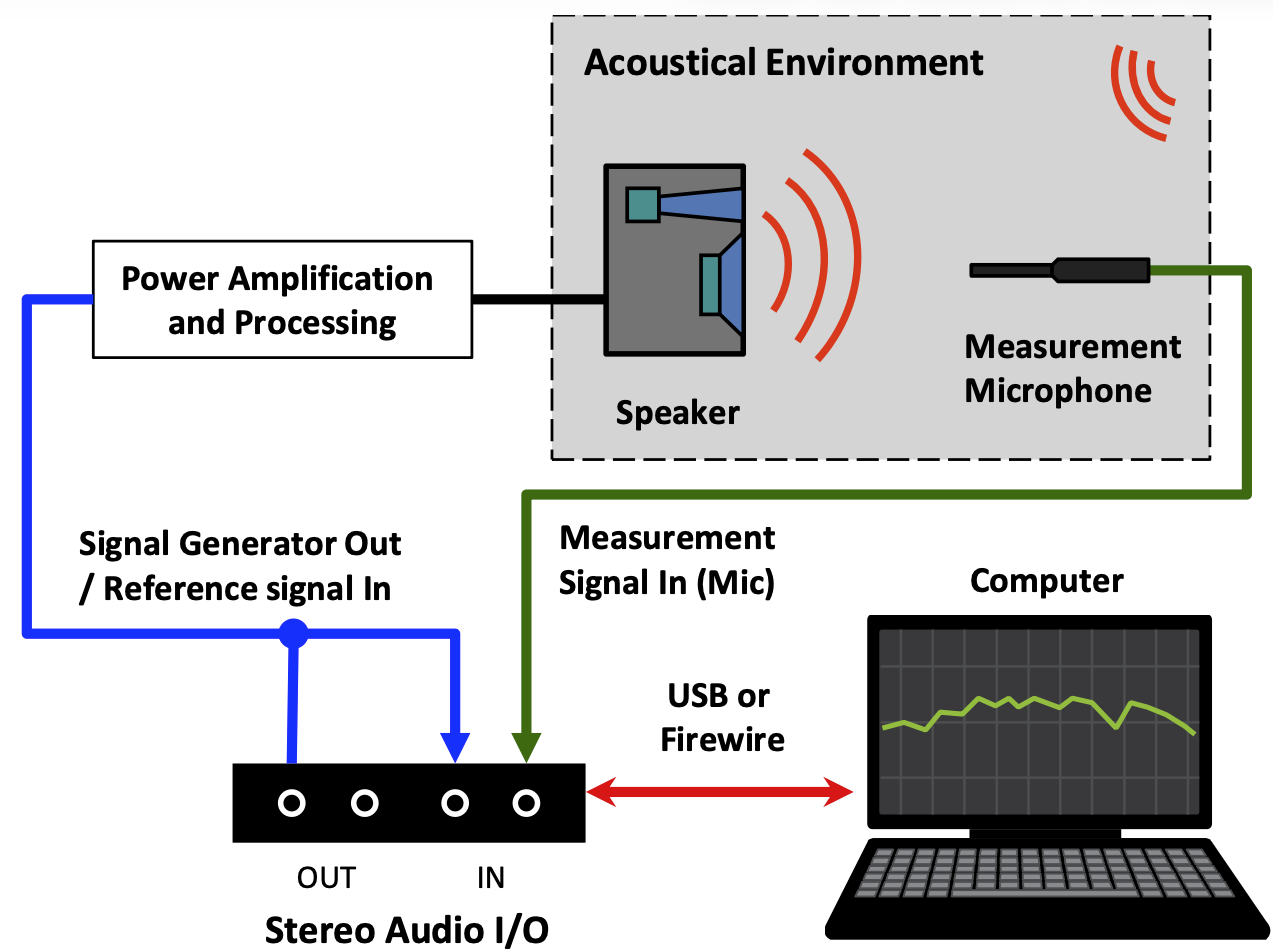
Basic connections and routing should be largely the same for any I-O device you may encounter. Note that the I-O device in this case could conceivably be the computer’s built-in stereo line input and headphone output, used in conjunction with a self-powered measurement microphone (or external mic preamp with a phantom power supply) and a little bit of creative cabling.
Multi-Channel I-O
Smaart v7 introduced the capability to run and display as many simultaneous real-time Spectrum and transfer function measurements as your computer can handle. Having a multi-channel I-O device enables you to set up multiple microphones to compare different measurement positions in real time, without a lot of running around to reposition a single mic. This can be advantageous when working with larger, more complex sound systems.
Traditional USB/FireWire Stand-Alone Interfaces
Eight-channel, single rack space packages are a common form factor for multi-channel audio interfaces. The single rack space format makes portability in a rack case (or in your backpack) equally viable. In addition to fielding more microphones, having more audio inputs enables you to tap into multiple electronic measurement points in a system.
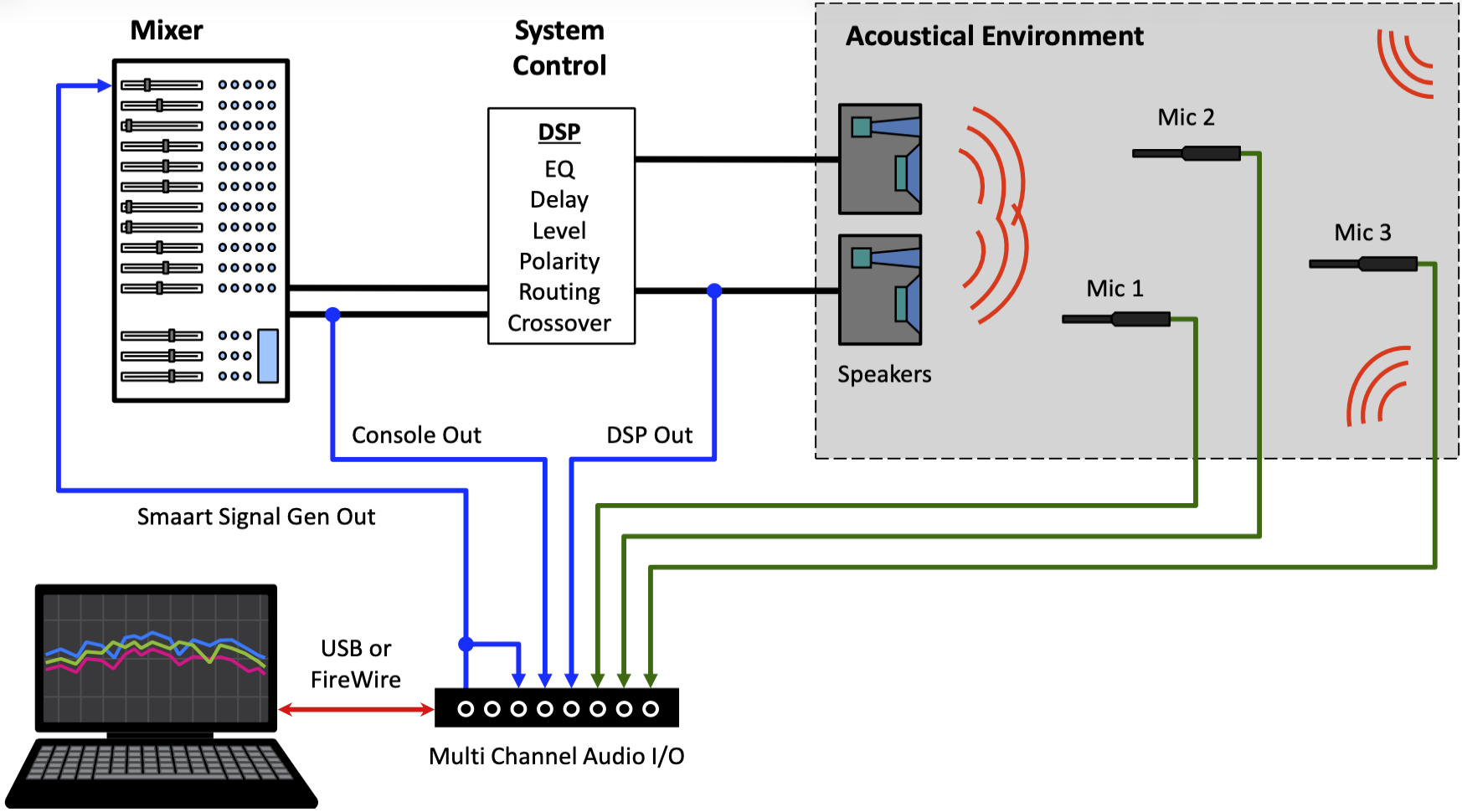
In the diagram above, we have three measurement microphones set up along with the electronic measurement points “pre-system-processing” and “pre-loudspeaker-system”. There is also a hard-wired loopback pre-console. The Console Out and DSP Out channels can be used as reference signals that let you isolate the response of the system either post-console or post-DSP. Alternatively, they can be used as measurement signals for analyzing the console, EQ, or crossover response in Smaart.
Network Audio I-O
The ability to digitize an audio system from end-to-end (from stage pre-amps all the way to the loudspeaker system or systems) has become a widely utilized reality in recent years. In some professional sound systems, the only analog signals present are those from the microphones to the stage conversion box, where they are digitized and then distributed wherever they are needed via the network.
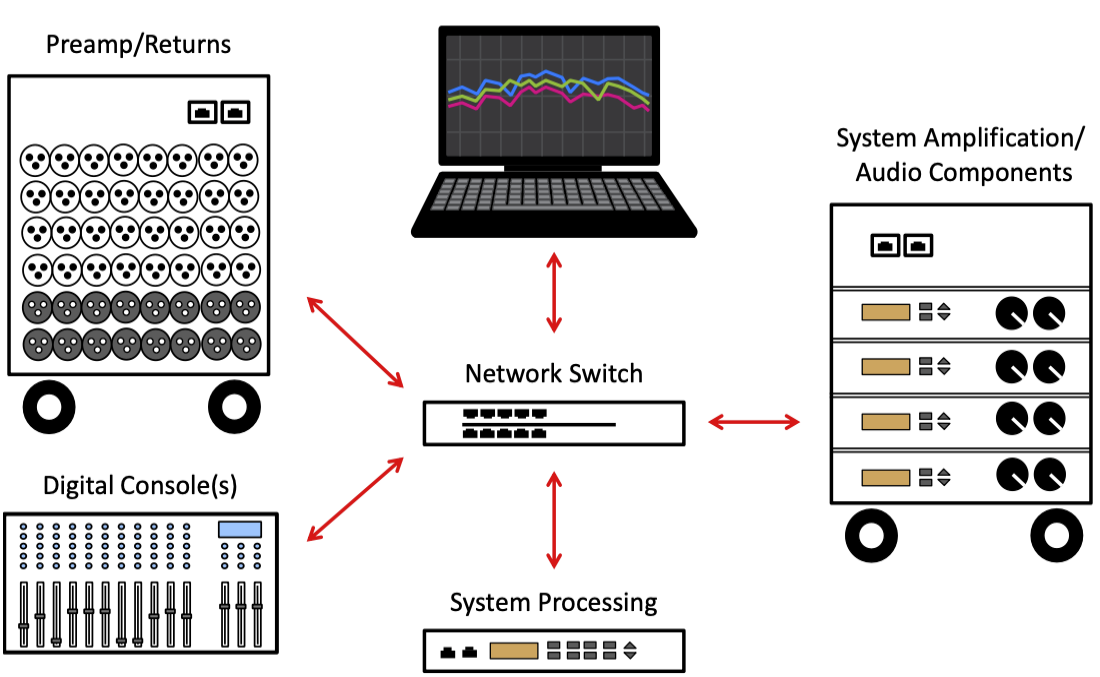
In this scenario, all you need in terms of audio I/O hardware for Smaart is a way to connect your computer to the network. Using the Audinate Dante network protocol as an example, a single connection to your computer’s Ethernet port makes any signal from any source connected anywhere on the network available for analysis in Smaart. Similarly, this would also enable you to send test signals from Smaart to any destination on the network capable of receiving an input stream.
The Dante Virtual Soundcard software application presents a selected group of audio streams from the network to Smaart as a standard, multi-channel ASIO or CoreAudio device. Smaart sees the virtual I-O device, just as it would any locally connected USB or Firewire I-O would. Selected audio streams from the network appear as input channels on the virtual I-O device and Smaart’s signal generator can be assigned to its output channels. Any and all routing for such a setup is done entirely within the Dante Controller application.